
How it works
From sign-up to the first order in under ten minutes.
Nothing to install, no new number, no team training. You connect the company WhatsApp, register what you sell, and the AI starts answering, taking orders and charging. Below, each step exactly as it happens.
- < 10 s
- to the first reply to the customer, even at rush hour
- 24 h
- of service, late night and holidays included
- 1
- single number: the one your customers already saved
- 0
- orders written down wrong by phone or on paper
The steps
Five steps, and most take under two minutes.
-
1 minute
Create the account
Company name, your email and the type of business. No credit card. Your login details arrive by email right away.
What you get: dashboard access with every feature of the chosen plan unlocked for 3 days.
-
2 minutes
Connect the company WhatsApp
Open WhatsApp on the store phone, point it at the QR Code in the dashboard and you are done. Same gesture as WhatsApp Web, on the number your customers already know.
No new SIM, no business line, no third-party approval. If you already use WhatsApp Web, you already know how.
-
5 minutes
Register what you sell
Menu, catalog or list of services, with price and photo. Type it in the dashboard, import a spreadsheet or pull it from your Bling ERP. What is here is exactly what the AI offers.
Opening hours, delivery fee by area, payment methods and house rules go on the same screen. The AI never makes up a price or an item.
-
automatic
The AI starts answering
A customer writes, the AI answers in seconds: shows the menu, clears doubts, takes the order with notes, works out delivery from the address and sends the payment. All in the same chat, in your business tone.
It understands text and voice notes, remembers what was said and leaves nobody hanging. When a topic is not hers, it hands over to a person and alerts you instantly.
-
live
You follow everything in the dashboard
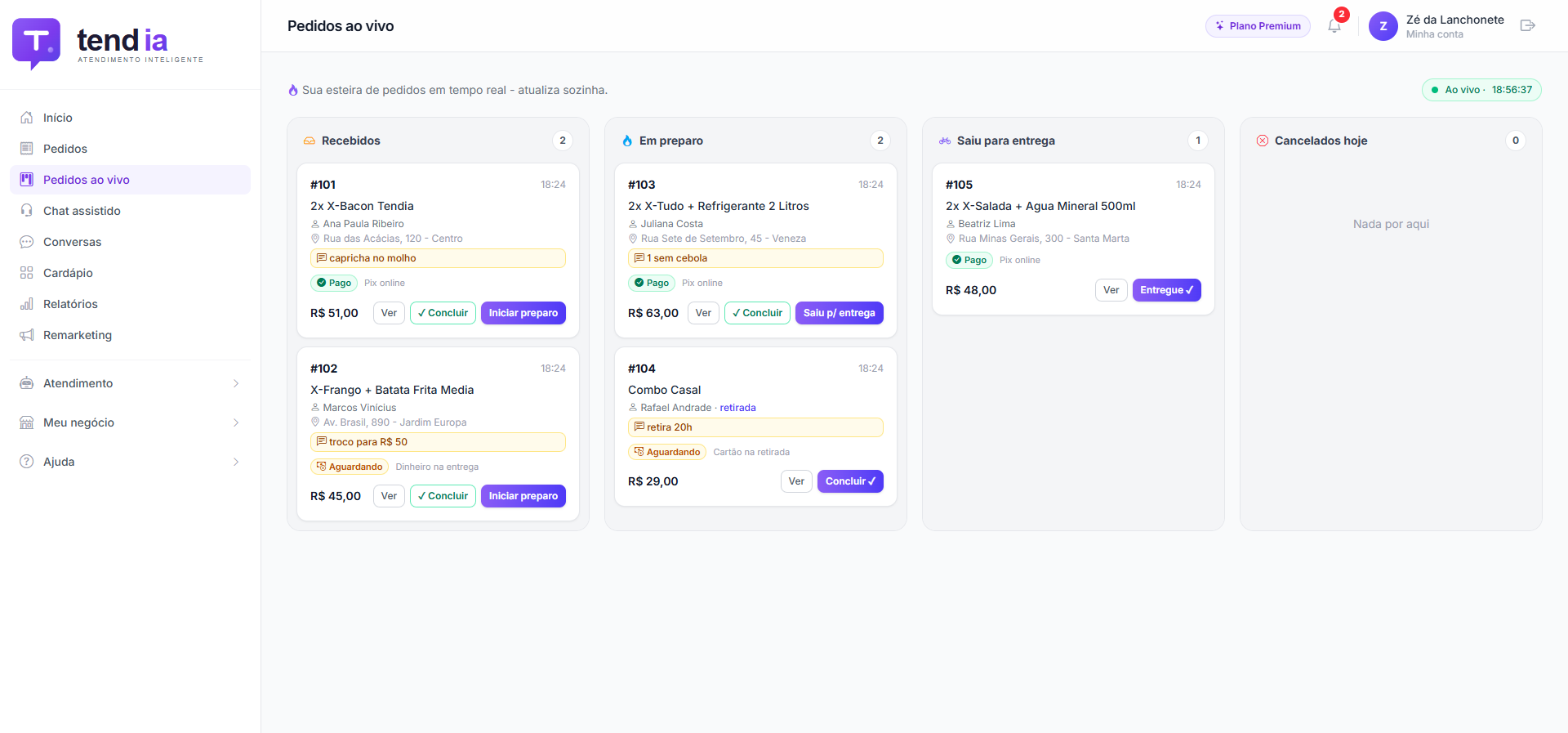
Every order lands on the live board with items, notes and payment. One click moves it to "preparing", another tells the customer it is on the way. Reports show best sellers and peak hours.
Want to answer personally? Take over the chat with one click, the AI pauses, and it resumes when you are done.
In practice
The screen that receives it all
The order the AI takes on WhatsApp lands on this board, live, ready for the kitchen.
Who it is for
Built for people who sell on WhatsApp and do not want to become system operators.
Delivery and fast food
Burgers, pizza, meal prep, açaí. Menu in the chat, "no onion" captured, fee by area, live board for the kitchen.
Salons, barbers and clinics
The AI offers real slots, books with no double booking, confirms the day before and reschedules when the customer asks.
Shops and service providers
Catalog with photos, stock questions answered instantly, quotes forwarded and payment by instant transfer or card.
Ten minutes stand between you and the first order taken on its own.
Create the account now and try it on your number, with your menu, free for 3 days. If it does not fit, simply do not continue.
3 full days · no card · cancel anytime